Key takeaways
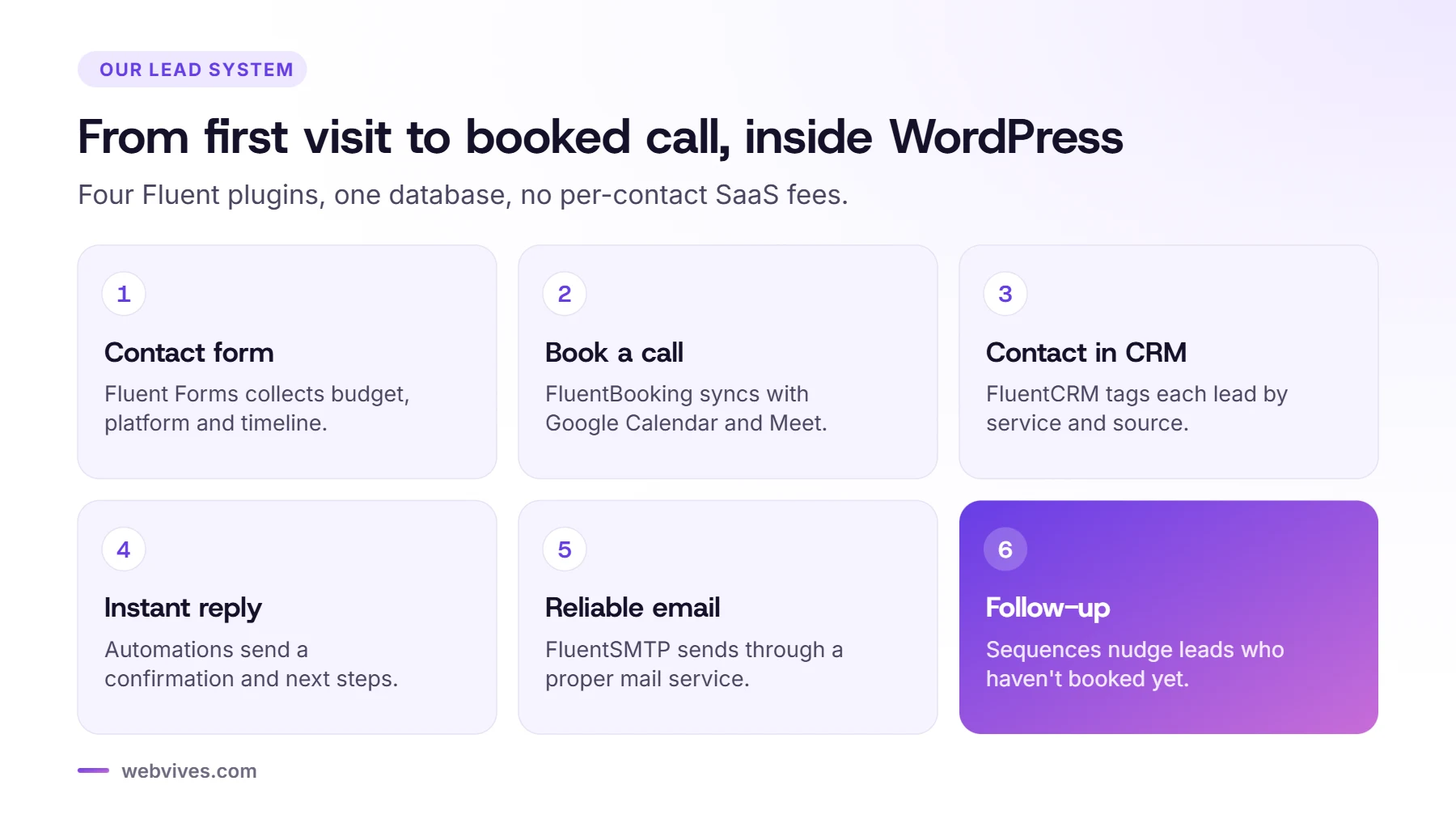
- Four plugins from one company handle our whole lead flow inside WordPress: forms, bookings, CRM and email delivery.
- Leads and contacts stay in our own database, and FluentCRM’s free version has no contact limit on its pricing page.
- FluentBooking syncs with Google Calendar and creates Google Meet links. Its FluentCRM integration needs FluentBooking Pro.
- FluentSMTP is the quiet hero: without it, WordPress emails often land in spam.
Why we chose one plugin family
Most small businesses stitch together a form plugin, a SaaS CRM, a booking tool and an email service, then pay monthly for each and connect them with Zapier. When we rebuilt webvives.com, we wanted fewer moving parts.
The Fluent plugins from WPManageNinja cover all four jobs and talk to each other natively:
- Fluent Forms for the contact and project enquiry forms
- FluentBooking for the free strategy call
- FluentCRM for contacts, tags and follow-up emails
- FluentSMTP to send all of those emails reliably
Everything lives in our WordPress database. There are no per-contact fees, and we can move the whole system with the site.
Step 1: The enquiry form (Fluent Forms)
Our contact form asks only what we need to reply with a useful answer: name, work email, website, platform (Shopify, WordPress or not sure), the service they need, budget range, timeline and project details. Platform, service, budget and timeline are dropdowns, so people can answer in a few clicks. An optional WhatsApp number and an NDA checkbox make it easy for clients who want a faster or more private conversation.
A few settings make a big difference:
- Spam protection: the free version supports reCAPTCHA, hCaptcha and Cloudflare Turnstile. We use reCAPTCHA, and load its script only when someone starts filling in the form, so it doesn’t slow down the page.
- Conditional logic: show extra questions only when they matter, for example store size if someone picks Shopify.
- Notifications: one email to us with all the answers, and a short confirmation to the visitor.
- Send to FluentCRM: map the fields and add tags such as the platform and the service.
Step 2: Booking a call (FluentBooking)
The Book a call page uses a FluentBooking one-to-one event. Its integrations include Google Calendar and Google Meet (bookings sync and Meet links are created automatically), Outlook and Apple Calendar, and Zoom.
Our strategy call is a 30-minute one-to-one event, with Google Meet or Zoom. We keep the booking form short and ask the visitor what they want to discuss, so we can prepare. FluentBooking can also send reminder emails before the call, which helps cut no-shows.
FluentBooking’s documentation lists its integrations, including FluentCRM, under the Pro version. With Pro, every booking can add or update the contact in FluentCRM, apply tags and start an automation. We started on the free versions and only plan to upgrade when the volume of calls makes it worth it.

Step 3: Contacts and follow-up (FluentCRM)
FluentCRM is a CRM and email marketing tool that runs inside WordPress. The free version includes contact management, segmentation, email campaigns, basic automations and integrations with other Fluent plugins. Pro adds email sequences, advanced automations, more integrations and deeper reports.
We keep it simple on purpose. Here’s the setup we use and recommend:
- Tags for the platform (Shopify, WordPress), the type of lead (website lead, strategy call, site check, care plan, white label) and the lead magnet someone downloaded.
- A welcome email that confirms the enquiry and links to two or three relevant guides.
- A pre-call email with a short checklist, so the call starts with real information.
- A gentle follow-up for people who sent an enquiry but haven’t booked a call yet.
Don’t over-automate. A personal reply from the founder beats a five-email sequence for most service businesses.
Step 4: Email that arrives (FluentSMTP)
By default, WordPress sends email from your web server, and many inboxes treat that as suspicious. FluentSMTP is a free plugin that sends WordPress email through a proper mail service (such as Amazon SES, Google Workspace or another provider) and keeps a log of every email sent. Set it up before you switch on any automations, and send yourself a test.
What it costs
Fluent Forms, FluentCRM and FluentBooking all have free versions on WordPress.org and paid Pro licenses. FluentSMTP is free. Pricing changes, so check the current plans on the WPManageNinja website. For a small agency or service business, the total is usually much less than a typical SaaS stack charged per contact or per user.
Tips from our setup
- Add a clear consent checkbox if you add people to a newsletter, and use double opt-in for marketing lists.
- Name your tags consistently from day one. Renaming hundreds of contacts later is painful.
- Test the full journey yourself: submit the form, book a call, check the CRM record and every email.
- Back up the database. Your leads now live in WordPress, so your backups matter more than ever.
Sources and further reading
- Fluent Forms free version (Fluent Forms)
- FluentCRM free vs Pro (FluentCRM)
- FluentBooking integrations overview (FluentBooking docs)
- FluentBooking free vs Pro (FluentBooking)
Frequently asked questions
Is FluentCRM free?
Yes, FluentCRM has a free version that includes contact management, email campaigns, basic automations and integrations with other Fluent plugins. FluentCRM Pro adds sequences, advanced automations and more integrations.
Does FluentBooking work with Google Calendar?
Yes. FluentBooking syncs bookings with Google Calendar and can create Google Meet links automatically. It also connects to Outlook, Apple Calendar and Zoom.
Can Fluent Forms send leads to FluentCRM?
Yes. Fluent Forms integrates with FluentCRM, so form entries can create or update contacts and apply tags automatically.
Do I need FluentSMTP?
If your site sends important emails, yes. FluentSMTP sends WordPress email through a proper mail service, which improves delivery and gives you a log of every message.
Is a self-hosted CRM a good idea for a small business?
It can be. You avoid per-contact fees and keep data in your own database, but you are responsible for updates, backups and security.