Key takeaways
- Expect to budget for three things: hosting, premium licences and someone’s time to do the maintenance.
- Professional care plans usually range from about $50 to $500+ per month, depending on how much development time and support is included.
- A good plan covers updates, off-site backups, security, uptime monitoring, speed checks and a monthly report, plus some development hours.
- Skipping maintenance usually costs more in the end: a hacked or broken site means emergency fees, downtime and lost rankings.
The quick answer
For a typical small business WordPress site, total maintenance costs usually land somewhere between $600 and $3,000 per year, depending on your hosting, the premium plugins you use, and whether you do the work yourself or pay a professional. Online stores and busy sites cost more, because there’s more to test and more at stake.
The three parts of WordPress maintenance cost
| Cost | Typical range | Notes |
|---|---|---|
| Hosting | $10–$100+/month | Cheap shared hosting is slower; managed WordPress hosting costs more but helps speed and security. |
| Domain and email | $15–$100+/year | Business email is often billed separately, per user. |
| Premium licences | $100–$500+/year | Premium theme, page builder, forms, SEO, backup or security plugins. Licences are needed for updates. |
| Maintenance work | $0 (DIY) to $500+/month | Your time, a freelancer, or an agency care plan. |
One thing we always recommend: keep your premium licences active. An expired licence usually means no updates, and an un-updated premium plugin is a common way in for attackers. Never replace a paid plugin with a “free” nulled copy; it’s one of the most common causes of hacked sites we clean.
DIY vs freelancer vs agency care plan
Doing it yourself costs nothing but time. It works well for simple sites if you’re comfortable updating carefully, checking the site afterwards and restoring from a backup if something breaks.
A freelancer is often cheaper per hour and can be a great option, but check what happens when they’re on holiday, busy or unavailable, and who else has access to your site.
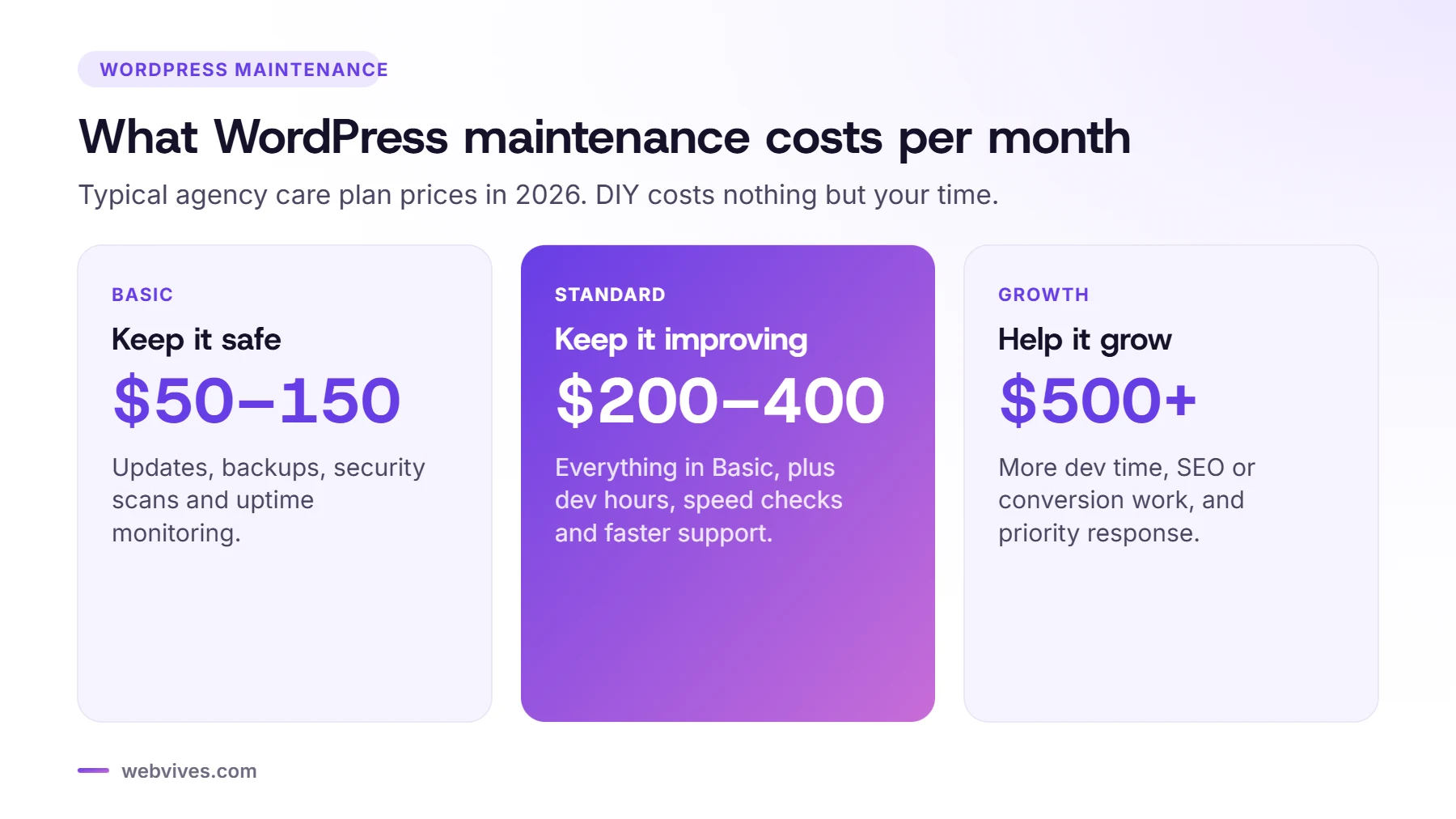
An agency care plan costs more than DIY but gives you a team, clear response times, documented processes and someone accountable when something goes wrong. Typical price ranges:
- Basic plans (about $50–$150/month): updates, backups, security scans and uptime monitoring.
- Standard plans (about $200–$400/month): everything above, plus a few development hours, speed checks and faster support.
- Growth plans (about $500+/month): more development time, SEO or conversion work, and priority response.
What a good maintenance plan should include
- Safe updates of WordPress core, themes and plugins, with checks afterwards (and a staging copy for bigger updates).
- Daily off-site backups, kept for at least 30 days, with restores actually tested.
- Security: malware scans, a firewall, login protection and quick action if something is found.
- Uptime monitoring, so someone knows within minutes when the site goes down.
- Speed and SEO checks: Core Web Vitals, broken links and Search Console errors.
- Development hours for content updates, new sections and small changes.
- A monthly report that explains what was done in plain English.
A simple monthly maintenance checklist
If you’re doing it yourself, this is the routine we follow on client sites:
- Check that last night’s backup exists and is stored off-site.
- Update plugins, themes and WordPress core, one group at a time, and check key pages after each.
- Test your contact forms, booking forms and (for stores) a test checkout.
- Review users and remove anyone who no longer needs access.
- Run a security scan and check for unknown files or admin accounts.
- Check Google Search Console for errors and broken pages.
- Run PageSpeed Insights on your homepage and one key page.
- Delete unused plugins and themes.
The real cost of skipping maintenance
Most of the emergency jobs we get could have been avoided. A hacked site usually means a cleanup fee, days of downtime, spam pages in Google and sometimes a hosting suspension. A broken update on an online store can stop orders for a whole weekend. Compared with that, a few hundred dollars a year for proper maintenance is cheap insurance.
Questions to ask before you choose a plan
- Where are backups stored, and when was a restore last tested?
- What happens if an update breaks something?
- Is malware cleanup included if the site gets hacked?
- How fast do you respond, and how do I contact you?
- Do unused development hours roll over?
- Can I cancel any time, and do I keep full access to my site?
How WebVives prices care plans
For reference, our own plans are Essentials at $99/month (updates, daily backups, security and monitoring for WordPress), Care at $299/month (adds 3 development hours, speed and SEO checks and malware cleanup, for WordPress or Shopify) and Growth at $699/month (8 development hours, a monthly CRO or SEO task and priority support). All plans are month to month.
Frequently asked questions
How much should I pay for WordPress maintenance?
Basic plans covering updates, backups, security and monitoring usually cost $50–$150 per month. Plans that include development hours, speed work and priority support typically cost $200–$700 per month.
Can I maintain my WordPress site myself?
Yes, if you have the time and confidence to update safely, test after updates, keep off-site backups and respond to security problems. Many owners start DIY and move to a care plan once the site matters more to the business.
Is hosting included in WordPress maintenance plans?
Usually not. Most care plans work with your existing hosting. Some agencies offer managed hosting as part of the plan, so check what’s included.
What happens if I don’t maintain my WordPress site?
Outdated plugins and themes become security risks, things break after automatic updates, the site gets slower, and backups may not exist when you need them. Most hacked sites we clean were not being maintained.
Sources and further reading
- Hardening WordPress (WordPress.org)
- Brute force attacks (WordPress.org)