Key takeaways
- Google says there are no special requirements for AI Overviews or AI Mode. Pages must be indexed and eligible to show a snippet.
- To appear in ChatGPT search, allow OpenAI’s OAI-SearchBot. Blocking GPTBot (training) doesn’t remove you from ChatGPT search.
- First-hand, specific content beats generic lists. Google’s guidance asks for unique, non-commodity content.
- Be consistent everywhere: your website, Google Business Profile, directories and social profiles should tell the same story.
The short answer
AI assistants build their answers from search indexes and the pages they can read. To get mentioned, make sure the right crawlers can reach your site, publish clear answers backed by your own experience, keep your business details consistent across the web, and earn mentions on other trusted sites. There is no secret file or special markup.
How Google chooses sources for AI Overviews and AI Mode
Google’s documentation is direct: there are no additional requirements to appear in AI Overviews or AI Mode, and no special optimization is needed. A page has to be indexed and eligible to show in Search with a snippet. Google also says you don’t need AI-specific text files or special schema.org markup.
A few details matter:
- Googlebot rules apply. AI features in Search follow your normal robots.txt rules for Googlebot.
- Google-Extended doesn’t control AI Overviews. It limits use of your content in some other Google AI systems, but not AI features in Search.
- Snippet controls work. nosnippet, data-nosnippet, max-snippet and noindex limit what can appear, including in AI features.
- You can measure it. Clicks from AI Overviews and AI Mode are counted in Search Console’s Performance report, and Google added a generative AI performance report in 2026.
How ChatGPT search finds websites
OpenAI uses separate crawlers for separate jobs:
| Crawler | What it does | Allow it? |
|---|---|---|
| OAI-SearchBot | Finds pages to show in ChatGPT search results | Yes, if you want to appear |
| GPTBot | Collects content that may be used to train models | Your choice |
| ChatGPT-User | Visits a page when a user asks ChatGPT to | Usually yes |
If your robots.txt, firewall or CDN blocks OAI-SearchBot, your pages can’t be shown in ChatGPT search answers. A simple rule looks like this:
User-agent: OAI-SearchBot
Allow: /
OpenAI says changes can take about 24 hours to apply. You can block GPTBot for training and still allow OAI-SearchBot.
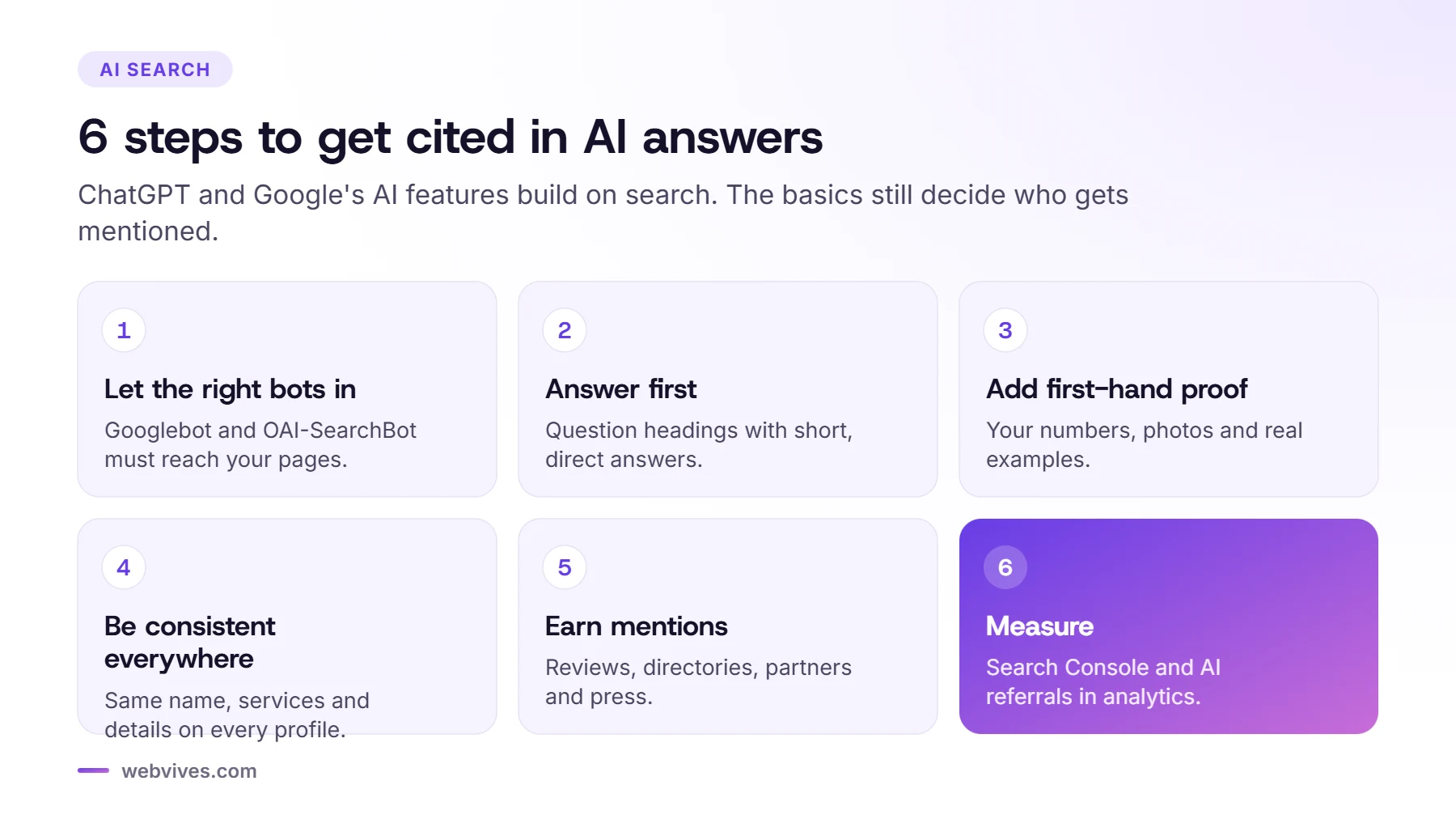
Step 1: Let the right bots in
Check your robots.txt, security plugin, firewall and CDN settings. Many sites block bots without knowing it. Hosting firewalls and bot protection services sometimes block crawlers by default, so test with your host’s logs or a crawler testing tool.
Step 2: Answer first, then go deep
AI answers lift short, clear passages. Write headings as the questions people actually ask, put a direct two or three sentence answer under each, then add the detail. Add an FAQ section for the follow-up questions you hear on sales calls.
Step 3: Add first-hand proof
Google’s guidance for its AI features asks for unique, non-commodity content based on your own knowledge or experience, and warns against mass-produced pages. That’s good news for small businesses: you have real projects, numbers and photos that nobody else can copy. Use them. Name the tools you used, show before-and-after results and explain what you would do differently.
Step 4: Be consistent everywhere
AI tools cross-check facts. Use the same business name, services, location and contact details on your website, Google Business Profile, LinkedIn, directories and partner listings. Add Organization structured data with links to your official profiles. It isn’t required for AI features, but it helps search engines connect the dots.
For local businesses, Google says a Business Profile and, for stores, Merchant Center feeds can help your business and products appear in AI responses.
Step 5: Earn mentions on other sites
You’re far more likely to be recommended if other trusted sites mention you: reviews on Google and industry platforms, partner directories such as the Shopify Partner Directory, local press, podcasts, and guest articles. One genuine review page often does more than ten blog posts.
Step 6: Measure what’s working
- Search Console: watch impressions and clicks for question-style queries, and the generative AI report.
- Google Analytics: look for referral traffic from chatgpt.com, perplexity.ai and similar sources.
- Manual checks: once a month, ask ChatGPT, Gemini and Perplexity the questions your customers ask, and note who gets mentioned.
What about llms.txt?
llms.txt is a proposed file that summarizes a site for AI tools. Google says Search doesn’t use it, so it neither helps nor harms your Google visibility. It’s harmless to add for other services, but it won’t replace the steps above.
Sources and further reading
- AI features and your website (Google Search Central)
- Optimizing your website for generative AI features on Google Search (Google Search Central)
- Overview of OpenAI crawlers (OpenAI)
- Search generative AI performance reports in Search Console (Google Search Central Blog)
- Optimizing your store for AI (Shopify Help Center)
Frequently asked questions
How do I get my business mentioned in ChatGPT?
Allow OpenAI’s OAI-SearchBot to crawl your site, publish clear answers to the questions customers ask, keep your business details consistent across the web, and earn mentions and reviews on other trusted sites.
Do I need special markup for Google AI Overviews?
No. Google says there is no special schema.org markup or file needed. Pages must be indexed and eligible to show a snippet, and normal SEO best practices apply.
Does blocking GPTBot remove my site from ChatGPT?
No. GPTBot is used for model training. ChatGPT search uses OAI-SearchBot, which you can allow separately.
Does llms.txt help with Google?
Google says Search doesn’t use llms.txt, so it neither helps nor harms your Google visibility.
How can I track traffic from AI answers?
Use Search Console for Google’s AI features and check referral traffic from sources like chatgpt.com and perplexity.ai in your analytics.