Key takeaways
- No method makes digital files 100% copy-proof. The goal is to make sharing inconvenient and traceable, without slowing down paying customers.
- The four controls that matter most are download limits, expiring links, PDF stamping (for ebooks and documents) and streaming-only previews (for audio and video).
- Shopify’s free Digital Downloads app is fine for simple files. For ebooks, music or courses, a specialized app gives you far more protection.
- Combine technical controls with a clear license in your product page and order email, and a takedown process for when files leak.
Why protecting digital downloads matters
Selling digital products on Shopify is attractive because there’s no stock and no shipping: a customer pays, and the file is delivered instantly. The flip side is that a file can be copied and shared just as instantly. For authors, musicians and course creators, a single leaked download link can quietly replace dozens of sales.
The good news is that you don’t need complex DRM to protect most digital products. A few well-chosen controls stop the majority of casual sharing, and they’re invisible to honest customers. Here’s what we set up on the digital product stores we build.
1. Limit how many times a file can be downloaded
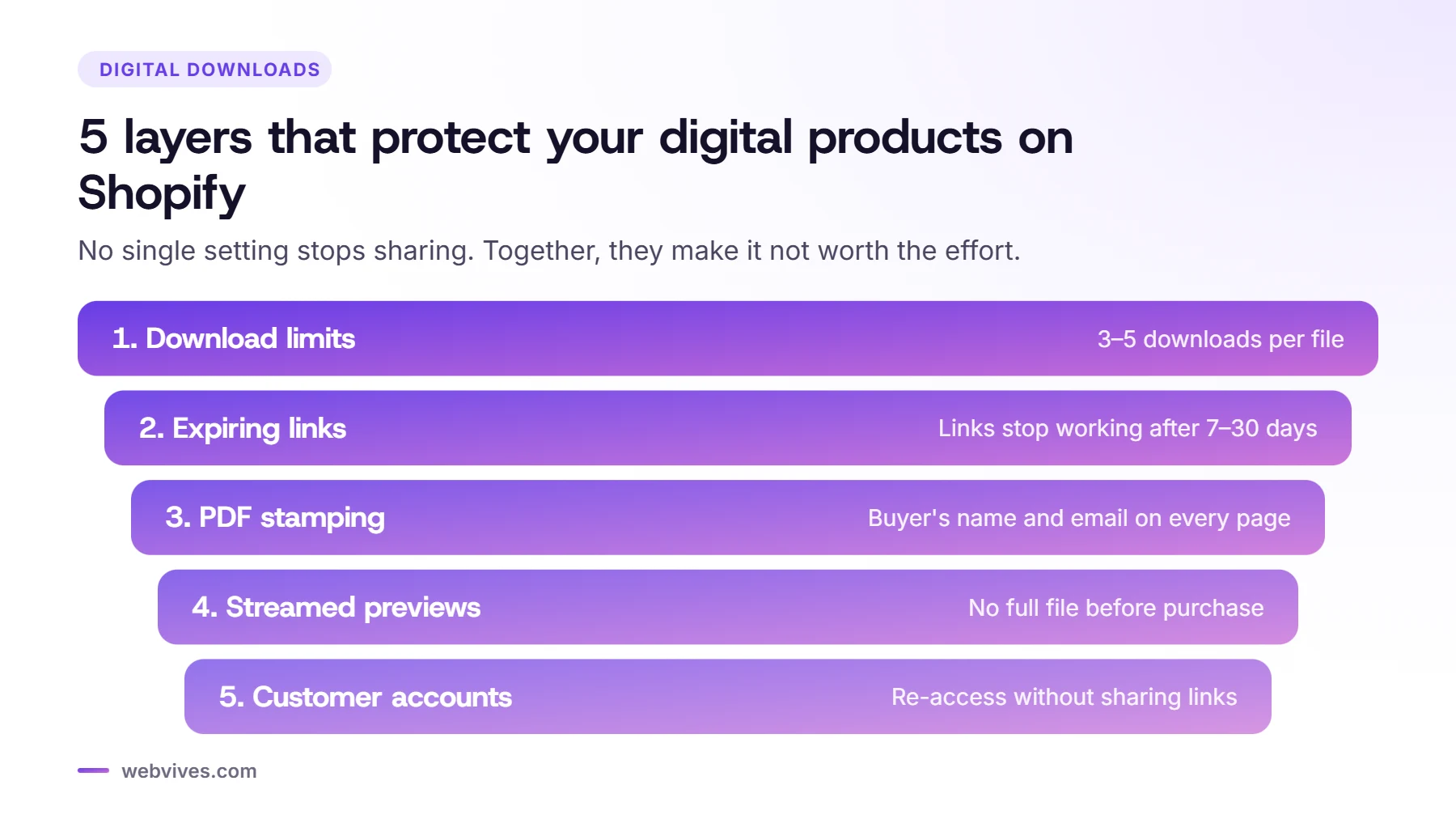
A download limit sets how many times each customer can download a file from their order link, typically 3 to 5 times. That’s generous enough for a customer who changes devices, but stops a single link from being shared with an entire group.
Our recommendation: 3 downloads for ebooks and guides, 5 for audio and video files (people often download on a phone and a laptop). Let customers request a reset by email if they genuinely need it.
2. Make download links expire
Expiring links stop working after a set time, for example 7 or 30 days after purchase. If a link ends up in a forum or a group chat months later, it simply doesn’t work.
Pair expiry with access through a customer account, so buyers can always log in and download again. That way you protect your files without creating support tickets from loyal customers.
3. Stamp PDFs with the buyer’s details
For ebooks, workbooks and guides, PDF stamping is the single most effective deterrent. The app adds the buyer’s name, email or order number to the pages of the PDF when it’s downloaded. It doesn’t technically stop copying, but very few people share a file that clearly shows their own name.
Keep the stamp subtle, for example a small line in the footer such as “Licensed to jane@example.com, Order #1042”, so it doesn’t spoil the reading experience.
4. Stream previews instead of sending full files
Music and video stores need previews, and this is where files most often leak. Never link a full-quality file as a “preview”. Instead:
- Use short clips (30–60 seconds for music) or lower-quality versions.
- Stream previews through a player rather than linking to a downloadable file.
- Deliver the full, high-quality file only after checkout.
On the karaoke and backing-track stores we built, customers can preview tracks and build playlists before buying, while full files are delivered securely only after payment.
5. Require a customer account for downloads
When downloads are tied to a customer account, links on their own are much less useful to anyone else. It also gives buyers a single place to find everything they’ve purchased, which reduces “I lost my file” emails.
6. Choose the right Shopify app
Shopify’s free Digital Downloads app lets you attach files to products and deliver them after checkout. It’s a good fit for simple, low-value files, but it offers fewer protection options than specialized apps.
For stores where protection matters, we usually use a dedicated digital delivery app. Depending on the store, we work with apps such as LDT Digital Downloads & Ebooks, Sky Pilot, Filemonk, Fileflare and Digital Downloads & PDF by BIG. Between them, these offer features like download limits, expiring links, PDF stamping, streaming and customizable download pages. Features and pricing vary by app and plan, so check the current listing in the Shopify App Store before you choose.
| Method | What it stops | Setup effort |
|---|---|---|
| Download limits | Unlimited re-downloads and casual sharing of the link | Low |
| Expiring links | Old links being posted in forums or groups | Low |
| PDF stamping | Ebooks and guides being passed around anonymously | Low |
| Streaming-only previews | Full files being grabbed from your product page | Medium |
| Customer account login | Downloads by people who didn't buy | Low |
| License keys | Software or templates used on more sites than paid for | Medium |
7. Add a clear license and a takedown plan
Technical controls work best alongside clear terms. Add a short license to each product page and to your order confirmation email, for example “For personal use only. Sharing or reselling this file is not permitted.”
If you find your files shared online, most platforms have a copyright takedown process (for example, a DMCA notice in the US). With stamped PDFs and order records, it’s usually easy to show which copy leaked and who it was sold to.
A simple setup that works for most stores
- Install a digital delivery app that supports download limits, expiring links and (for PDFs) stamping.
- Set 3–5 downloads per file and a 7–30 day link expiry, with re-access through customer accounts.
- Turn on PDF stamping with a subtle footer line.
- Use short, streamed previews for audio and video.
- Add a license line to product pages and the order email.
- Test the full flow yourself: buy, download, try the link again, and wait for it to expire.
Done well, this takes a few hours to set up and protects every sale you make from then on.
Frequently asked questions
Can Shopify stop people from sharing my digital files?
Not completely. Once someone downloads a file, they can copy it. What Shopify apps can do is limit how many times and for how long a file can be downloaded, stamp files with the buyer’s details, and stream previews instead of sending the full file, which makes sharing much less attractive.
Is Shopify’s free Digital Downloads app enough?
For simple, low-value files, often yes. For ebooks, music, video, courses or anything people are likely to share, a specialized app with download limits, expiring links and PDF stamping is worth the monthly cost.
What is PDF stamping?
PDF stamping adds the buyer’s name, email or order number to every page of a PDF when it’s downloaded. It doesn’t block copying, but buyers are much less likely to share a file that clearly shows who bought it.
Sources and further reading
- Selling digital products (Shopify Help Center)
- Shopify Digital Downloads app (Shopify App Store)